
Tables can be used on web pages to display information in a tabular manner, that is information is displayed in form of rows and columns.
HTML tables are created with the <table> element the content or the text within the table are written row by row.
<tr> element indicates the beginning of the row and it stands for table row, within the table row data is written using the <td> elements which stands for table data.
Example
<!DOCTYPE html>
<html>
<head><title>Tables</title></head>
<body>
<This is an example of a table>
<table>
<tr>
<td>Shoes</td>
<td>Handbags</td>
<td>Blouses</td>
</tr>
<tr>
<td>50</td>
<td>40</td>
<td>20</td>
</tr>
</body>
</html>
Border
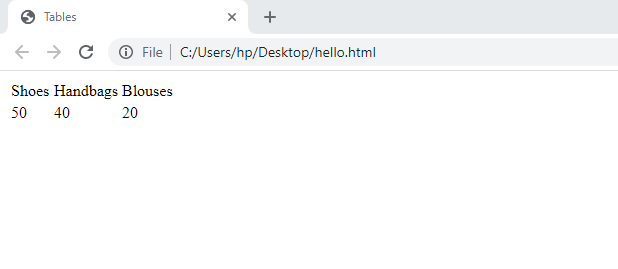
The above table displays data without borders or lines within the rows and columns. In order to achieve that border attribute is used on the table tag.
Example
<!DOCTYPE html>
<html>
<head><title>Tables</title></head>
<body>
<p>This is an example of a table</p>
<table border=”1″>
<tr>
<td>Shoes</td>
<td>Handbags</td>
<td>Blouses</td>
</tr>
<tr>
<td>50</td>
<td>40</td>
<td>20</td>
</tr>
</body>
</html>

Headings
Headings are created with the <th> element, it stands for table headings.
<th> can be used to represent headings either on rows and columns
Scope attribute can be used on the <th> to indicate whether it is a heading for a column or a row.
Example
<!DOCTYPE html>
<html>
<head><title>Tables</title></head>
<body>
<p>This is an example of a table</p>
<table border=”1″>
<tr>
<th></th>
<th scope=”col”>Shoes</th>
<th scope=”col”>Handbags</th>
<th scope=”col”>Blouses</th>
</tr>
<tr>
<th scope=”row”>Products sold:</th>
<td>40</td>
<td>30</td>
<td>50</td>
</tr>
<tr>
<th scope=”row”>Products in stock:</th>
<td>50</td>
<td>40</td>
<td>20</td>
</tr>
</body>
</html>

Rows and Column Spanning
Spanning is the merging of entries in rows or columns.
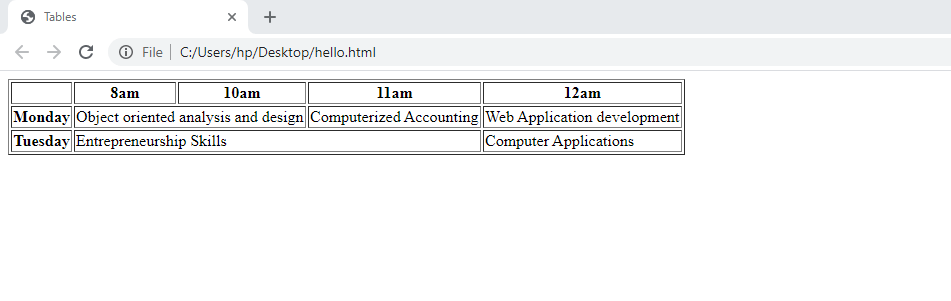
The colspan attribute can be used to indicate how many columns that cell should run across it and can be used on a <th> or <td> element. The value of the colspan attribute is the number of columns that column will stretch across.
Example on colspan
<!DOCTYPE html>
<html>
<head><title>Tables</title></head>
<body>
<table border=”1”>
<tr>
<th></th>
<th>8am</th>
<th>10am</th>
<th>11am</th>
<th>12am</th>
</tr>
<tr>
<th>Monday</th>
<td colspan=”2″>Object oriented analysis and design</td>
<td>Computerized Accounting </td>
<td>Web Application development</td>
</tr>
<tr>
<th>Tuesday</th>
<td colspan=”3″>Entrepreneurship Skills </td>
<td>Computer Applications</td>
</tr>
</table>
</body>
</html>
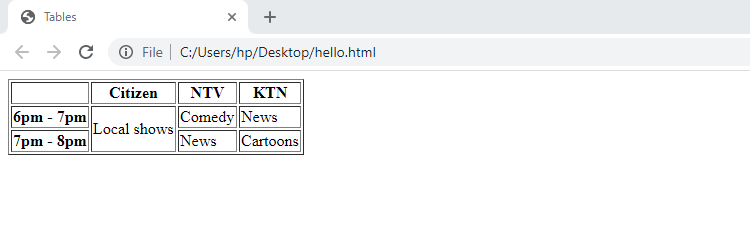
Rows can be spanned the same way like the columns, spanning rows is achieved with the rowspan attribute.
The rowspan attribute can be used on both <th> and <td> elements to indicate how many rows a cell
should span down the table.
<!DOCTYPE html>
<html>
<head><title>Tables</title></head>
<body>
<table border=”1″>
<tr>
<th></th>
<th>Citizen</th>
<th>NTV</th>
<th>KTN</th>
</tr>
<tr>
<th>6pm – 7pm</th>
<td rowspan=”2″>Local shows</td>
<td>Comedy</td>
<td>News</td>
</tr>
<tr>
<th>7pm – 8pm</th>
<td>News</td>
<td>Cartoons</td>
</tr>
</table>
</html>
</body>
Cellspacing and cellpadding
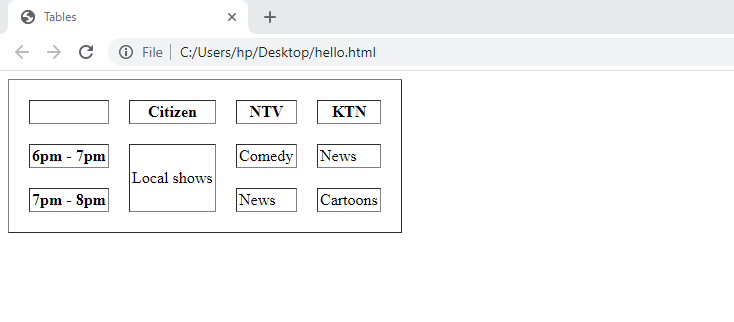
Cellspacing is an attribute that defines space between table cells.
Cellpadding is the distance between borders of the cells and the text within the cell.
<!DOCTYPE html>
<html>
<head><title>Tables</title></head>
<body>
<table border=”1″ cellpadding=”2″ cellspacing=”20″>
<tr>
<th></th>
<th>Citizen</th>
<th>NTV</th>
<th>KTN</th>
</tr>
<tr>
<th>6pm – 7pm</th>
<td rowspan=”2″>Local shows</td>
<td>Comedy</td>
<td>News</td>
</tr>
<tr>
<th>7pm – 8pm</th>
<td>News</td>
<td>Cartoons</td>
</tr>
</table>
</html>
</body>
Exercise
- State and explain all the tags that are used to create tables
- Differentiate between the following attributes as used in tables: Rowspan and colspan. Cellpadding and cellspacing
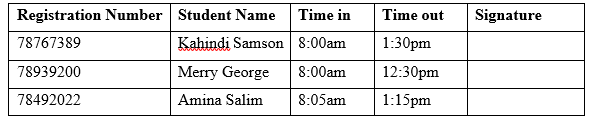
- Design the table below using HTML
 Study with Jamila