
FORMATTING HTML TABLES
Different formatting styles can be applied on HTML tables such as changing the border color, border styles and background colors on a table
Lets see how we can apply the above techniques on HTML tables
Changing table border colors
The borders of the tables and cells can change colors and patterns.
The bordercolor attribute is used to specify the table border color.
Example
<!DOCTYPE html>
<html>
<head><title>Tables</title></head>
<body>
<p>This is an example of a table</p>
<table border=”1″ bordercolor= “blue”>
<tr>
<td>Shoes</td>
<td>Handbags</td>
<td>Blouses</td>
</tr>
<tr>
<td>50</td>
<td>40</td>
<td>20</td>
</tr>
</body>
</html>

Changing border Style
Table border can change its style using CSS.
CSS stands for cascading style sheet this will be covered later on other chapters.
The border style can change to thick, dotted, or dashed.
A style attribute can be used within the table element.
Example
<!DOCTYPE html>
<html>
<head><title>Tables</title></head>
<body>
<p>This is an example of a table</p>
<table style = “border:1px solid black;”>
<tr>
<td>Shoes</td>
<td>Handbags</td>
<td>Blouses</td>
</tr>
<tr>
<td>50</td>
<td>40</td>
<td>20</td>
</tr>
</body>
</html>

Changing the table border to dotted
<!DOCTYPE html>
<html>
<head><title>Tables</title></head>
<body>
<p>This is an example of a table</p>
<table style = “border:1px dotted black;”>
<tr>
<td>Shoes</td>
<td>Handbags</td>
<td>Blouses</td>
</tr>
<tr>
<td>50</td>
<td>40</td>
<td>20</td>
</tr>
</body>
</html>
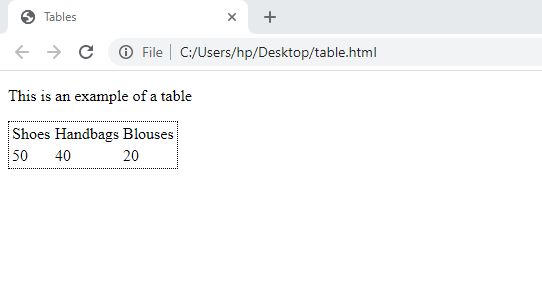
Changing the table border to dashed
<!DOCTYPE html>
<html>
<head><title>Tables</title></head>
<body>
<p>This is an example of a table</p>
<table style = “border:1px dashed black;”>
<tr>
<td>Shoes</td>
<td>Handbags</td>
<td>Blouses</td>
</tr>
<tr>
<td>50</td>
<td>40</td>
<td>20</td>
</tr>
</body>
</html>
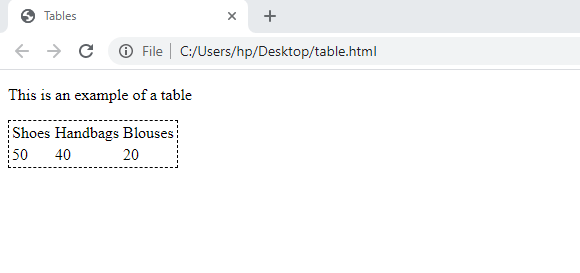
Adding Borders to the table cells
From the above examples you saw the borders were being displayed around the table but not within the cells, lets now add the cell borders to the tables.
Example
<!DOCTYPE html>
<html>
<head><title>Tables</title></head>
<body>
<p>This is an example of a table</p>
<table style = “border:1px solid black;”>
<tr style=”border:1px solid black;”>
<td style=”border:1px solid black;”>Shoes</td>
<td style=”border:1px solid black;”>Handbags</td>
<td style=”border:1px solid black;”>Blouses</td>
</tr>
<tr style=”border:1px solid black;”>
<td style=”border:1px solid black;”>50</td>
<td style=”border:1px solid black;”>40</td>
<td style=”border:1px solid black;”>20</td>
</tr>
</body>
</html>
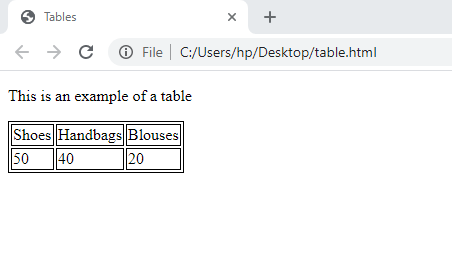
Collapsing the border
By default, borders in HTML tables are being displayed in a double solid lines, lets now see how we can remove the spaces between the double line and make them appear as a single line.
This can be achieved by using the CSS border-collapse property within the table elements.
Example
<!DOCTYPE html>
<html>
<head><title>Tables</title></head>
<body>
<p>This is an example of a table</p>
<table style = “border:1px solid black; border-collapse:collapse“>
<tr style=”border:1px solid black;”>
<td style=”border:1px solid black;”>Shoes</td>
<td style=”border:1px solid black;”>Handbags</td>
<td style=”border:1px solid black;”>Blouses</td>
</tr>
<tr style=”border:1px solid black;”>
<td style=”border:1px solid black;”>50</td>
<td style=”border:1px solid black;”>40</td>
<td style=”border:1px solid black;”>20</td>
</tr>
</body>
</html>
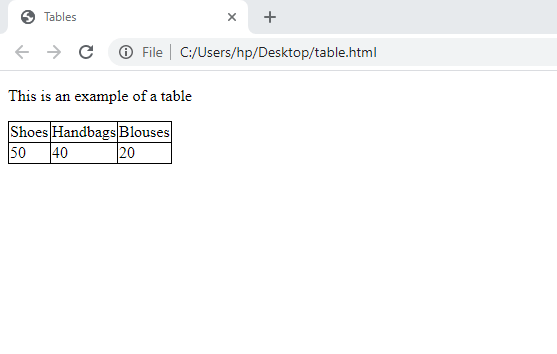
Background colors in HTML tables
Just like table borders background colors can be changed using the CSS.
The CSS background-color property can be used to set the background color of the table.
Changing the background color for the entire table
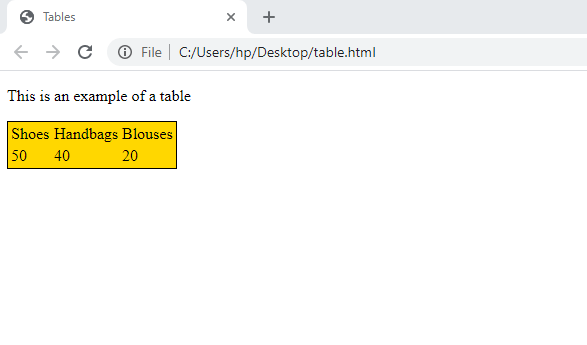
If you want to change the table color of the whole table use the background-color property on the opening tag of the table.
Example
<!DOCTYPE html>
<html>
<head><title>Tables</title></head>
<body>
<p>This is an example of a table</p>
<table style = “border:1px solid black; background-color:gold“>
<tr>
<td>Shoes</td>
<td>Handbags</td>
<td>Blouses</td>
</tr>
<tr>
<td>50</td>
<td>40</td>
<td>20</td>
</tr>
</body>
</html>
Changing background color for table row.
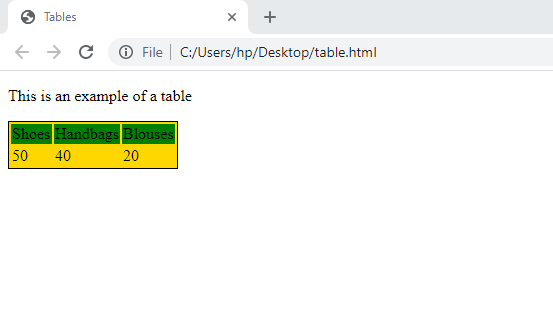
Use the CSS background-color property on the <tr> tag to change the row color.
Example
<!DOCTYPE html>
<html>
<head><title>Tables</title></head>
<body>
<p>This is an example of a table</p>
<table style = “border:1px solid black; background-color:gold”>
<tr style = “border:1px solid black; background-color:green”>
<td>Shoes</td>
<td>Handbags</td>
<td>Blouses</td>
</tr>
<tr>
<td>50</td>
<td>40</td>
<td>20</td>
</tr>
</body>
</html>
Changing the background color for a single cell
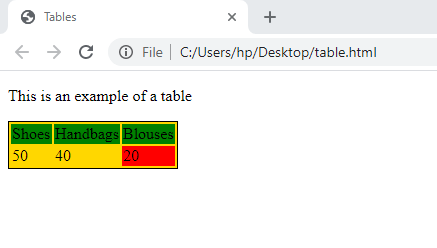
Use the same CSS code but here insert it at either <td> or <th> tag.
Example
<!DOCTYPE html>
<html>
<head><title>Tables</title></head>
<body>
<p>This is an example of a table</p>
<table style = “border:1px solid black; background-color:gold”>
<tr style = “border:1px solid black; background-color:green”>
<td>Shoes</td>
<td>Handbags</td>
<td>Blouses</td>
</tr>
<tr>
<td>50</td>
<td>40</td>
<td style=”background-color:red”>20</td>
</tr>
</body>
</html>
EXERCISE
- Outline the two main types of attributes that can be used in formatting HTML tables
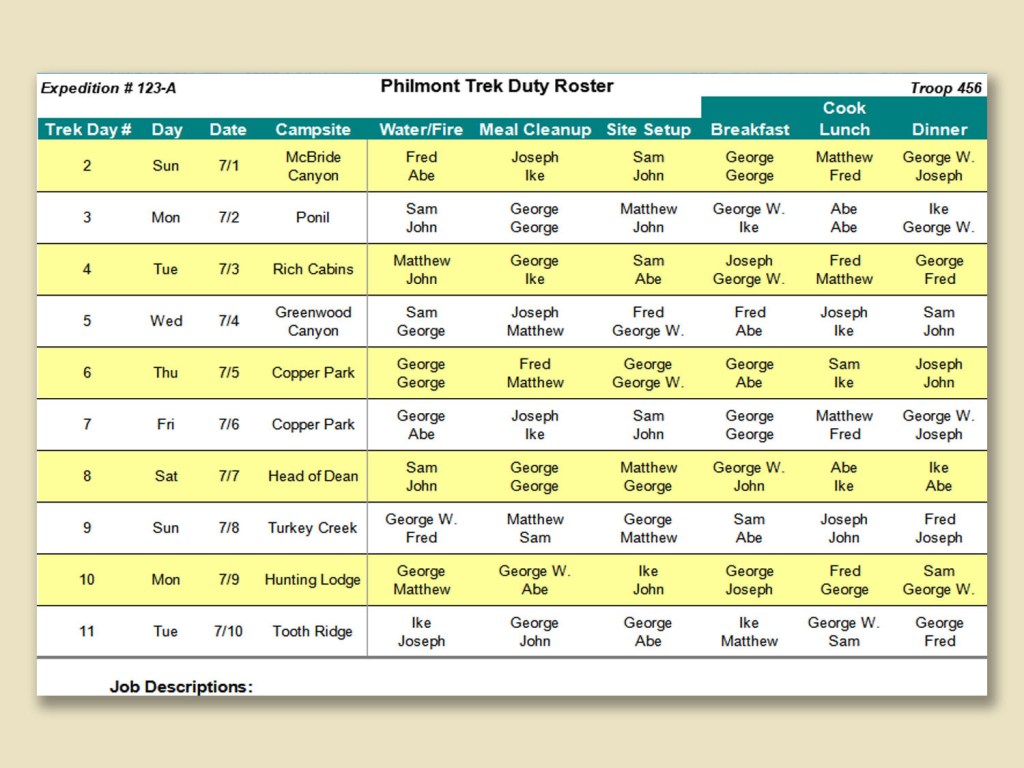
- Design the table below using HTML
 Study with Jamila