
SEMANTIC MARKUP
Semantic markups are composed of the following
- Strong and Emphasis
- Quotations
- Abbreviations and Acronyms
- Citations and Definitions
i. Strong and Emphasis
In HTML to display content with strong emphasis the <strong> element is used browsers will show the contents of a <strong>element in bold.
Example
<!DOCTYPE html>
<html>
<head><title>News</title></head>
<body>
<p> <strong>Beware</strong > No one should go out in public without a masks</p>
</body>
</html>

The <em> element is used to add emphasis on text, The <em> element indicates emphasis that subtly changes the meaning of a sentence. browsers will show the contents of an <em> element in italic.
Example
<!DOCTYPE html>
<html>
<head><title>News</title></head>
<body>
<p> <strong>Beware</strong > No one should go out in public without a <em> masks</em></p>
</body>
</html>
ii. Quotations
There are two elements that are used in marking up quotations
- Blockquote
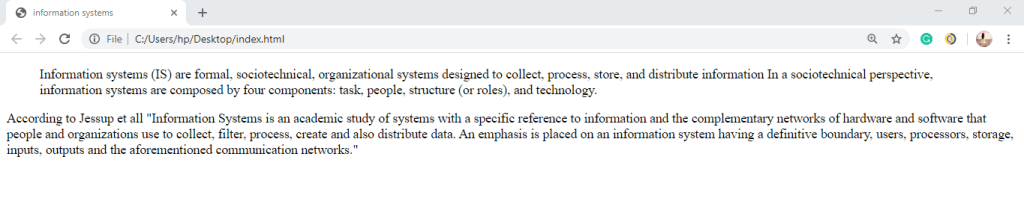
The <blockquote> element is used for larger quotes that take up an entire paragraph. Note how the <p> element is still used inside the <blockquote> element. Browsers tend to indent thecontents of the <blockquote> element.
- Quote
The <q> element is used for smaller quotes that sit within a paragraph. Browsers are supposed to put quotes around he <q> element.
Example
<!DOCTYPE html>
<html>
<head><title>information systems</title></head>
<body>
<blockquote cite= “ https://en.wikipedia.org/wiki/Information_system”>
<p> Information systems (IS) are formal, sociotechnical, organizational systems designed to collect, process, store, and distribute information In a sociotechnical perspective, information systems are composed by four components: task, people, structure (or roles), and technology.</p>
</blockquote>
<p> According to Jessup et all <q>Information Systems is an academic study of systems with a specific reference to information and the complementary networks of hardware and software that people and organizations use to collect, filter, process, create and also distribute. An emphasis is placed on an information system having a definitive boundary, users, processors, storage, inputs, outputs and the aforementioned communication networks.</q> </p>
</body>
</html>
iii. Abbreviations and Acronyms
The <abbr> element is used for the abbreviations followed by the title attribute on the opening tag is used to specify the full term.
While the <acronym> element is used for specifying an acronym followed by the title attribute on the opening tag.
Example
<!DOCTYPE html>
<html>
<head><title>Abbreviations </title></head>
<body>
<p> <abbr title = “temperature”> temp </abbr> of Mombasa island ranges from 26-33 degrease </p>
<p> <acronym title = “Jomo Kenyatta University of Agriculture and Technology”> JKUAT </acronym> This is a University of global excellence in Training, Research, Innovation and Entrepreneurship for development.</p>
</body>
</html>

When hovering around the acronym or abbreviated term with the mouse the full term will be displayed
iv. Citations and Definitions
Citations is important when the web page authors wish to cite work from books or research paper from another author. The <cite> element is used to indicate where the citation is from.
<!DOCTYPE html>
<html>
<head><title>Citations</title></head>
<body>
<p><cite>The lord of the rings </cite> by J. R. R. Tolkien has sold over one hundred an fifty million copies worldwide. And the book is about fantasy </p>
</body>
</html>
If the web page author would want to define some terminologies on his web page he/she can use the <dfn> element.
The <dfn>element is used to indicate the defining instance of a new term. Some browsers show the content of the <dfn> element in italics.
Example
<!DOCTYPE html>
<html>
<head><title>Definitions</title></head>
<body>
<p> <dfn> Website </dfn> A set of related web pages typically served from a single web host</p>
</body>
</html>

Making changes to the content
Changes can be made on the content by use of the following tags
<ins>, <del> and <s>
The <ins> element can be used to show content that has been inserted into a document, The content of a <ins> element is usually underlined,
while
the <del> element can show text that has been deleted from it. while the content of a <del> element usually has a line through it.
Example
<!DOCTYPE html>
<html>
<head><title>making changes</title></head>
<body>
<p> The recipe I saw on <del>pinterest</del> <ins> Facebook </ins> I tried it the food was so delicious</p>
</body>
</html>

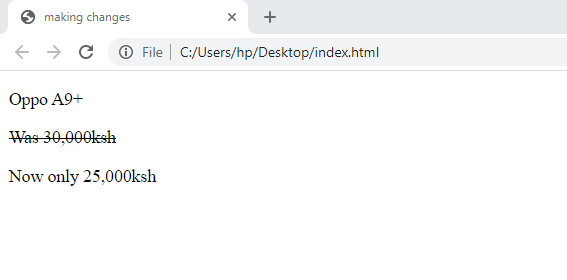
The <s> element indicates something that is no longer accurate or relevant (but that should not be deleted). Visually the content of an <s> element will usually be displayed with a line through the center.
Example
<!DOCTYPE html>
<html>
<head><title>making changes</title></head>
<body>
<p> Oppo A9+</p>
<p><s>Was 30,000ksh</s></p>
<p>Now only 25,000ksh</p>
</body>
</html>
 Study with Jamila
Informative post on formatting text.
LikeLiked by 1 person
Helpful post on formatting text.
LikeLiked by 1 person